AI video translation: set the spoken language first, then make other language versions
When a film is going to people in different countries, language matters in two places: what language the characters speak, and what language the subtitles are in. The first has to be set before you render; changing it afterwards means rendering again. The second can be changed after the film is done, without redoing the picture.
This page follows the lessons in Nova Academy to show where each one is set, what it costs, and how to find out why a character spoke the wrong language.
1. Films: set the dialogue language at the start
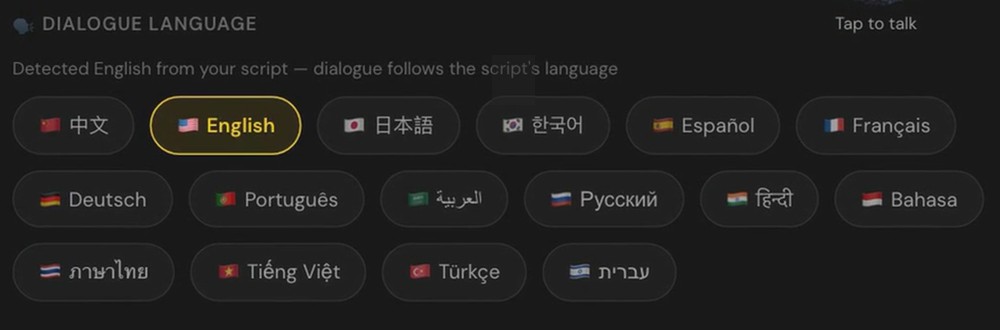
After you import a script, Nova reads it and pre-selects a few things on the project setup page. One of them is Dialogue Language. It detects the language from the script text and says "Detected English from your script — dialogue follows the script's language". If it got it wrong, pick the right language here.
→ Lesson 09-01 "You already have a script: from a file to a cast list" (free lesson, just sign up)
2. Ads: Film language defaults to English
The ad line works differently: Film language defaults to English, whatever language your interface is in. It sits in the shooting settings row on the first screen of the ad workbench, next to the aspect ratio. If the ad should be in another language, change it right away. It's free.
Do this first, because reading your materials, pitching directions and writing the script all follow it. The "Language of the film" dropdown above the write-script button is the same setting, so once you've set it at the start you don't need to touch it again.
Film language also sets the on-screen text, and it shapes who appears on camera, so pick the language of the market you're running in.
→ Lesson 01-06 "Only materials, no copy: let AI read first, then pitch directions" (free lesson) → Lessons 01-T2 "The ad workbench: which buttons write, and which are just settings" and 01-K "The ad line: eight things the buttons don't tell you" (Starter)
3. Language versions of the finished ad: subtitles only, no new video
Once you've pressed Combine on the delivery page, a language row appears: Original, English, Español, 日本語, 한국어. Pick one and the subtitles are translated into it and combined again.

- The first translation into a language costs 55 credits. Switching back to one you've already translated costs 0.
- No new video is generated, and what the characters say doesn't change. Only the subtitles do.
- You can also download the subtitle file on its own.
→ Lesson 01-T4 "The delivery page: post settings, the ending, combine, and what appears after" (Starter)
4. A character spoke the wrong language? Check the receipt
The spoken language is set per shot by that shot's own lines, and only the dialogue field counts. Dialogue typed into the visual description doesn't. If characters in one shot use different languages, each speaks their own. Only lines too short to tell ("OK", "Hm") follow the episode's main language.
To find the cause, open a rendered shot. Under "What was actually sent last time", open "Full prompt sent to the model": the first few lines say which language was locked. If the episode has no dialogue at all, there's no lock.
→ Lesson 12-02 "Characters speaking the wrong language: find the language lock at the top of the receipt" (bonus Q&A, included with any paid course)
FAQ
Can AI translate my video into another language? For ads, the delivery page switches subtitles to English, Spanish, Japanese or Korean without rendering new video. The first translation into a language costs 55 credits. What the characters say stays the same.
Does a language version re-voice or lip-sync the video? No. Switching language on the delivery page changes the subtitles only; the voices stay in the original language. To have a character speak another language, their lines have to be in that language: for an ad, change the film language first, then rewrite the script (a written script doesn't switch language by itself, and rewriting is charged again), then render again, at the normal price.
Why did my ad come out in English? Film language on the ad line defaults to English, whatever your interface language. Change it on the first screen before you render. It's free.
Where to start
- Just looking: sign up free, no card needed. Signing up unlocks lessons 01-06 and 09-01.
- Ad language settings and language versions on the delivery page are in Starter. Compare courses
- Making an ad from scratch: AI video ads.