AI subtitles: Nova builds them from your script's dialogue
To be clear up front: this page is about adding subtitles to a film you made in Nova. Nova isn't a standalone subtitle tool, so you can't upload a video from somewhere else and caption it. It doesn't listen to the audio either. The subtitles come from the dialogue in your script.
You wrote the script and rendered the film in Nova, so the dialogue is already there. When you put the film together, Nova turns those lines into subtitles, and you don't type anything. This page follows the Nova Academy lessons to show where subtitles come from, how to edit them, which files you export, and whether they cost credits.
1. Where subtitles come from: your script's dialogue
On the film line, each episode's production room has a "Subtitles SRT" row that builds subtitles from each beat's dialogue. If an episode has no dialogue, there are no subtitles.
You can fix the text: in the production room every subtitle line can be edited or deleted (the delete tip notes the line may really be an action description, not dialogue). In the fine-cut editor's subtitle track you can double-click to edit, drag to move a block or stretch how long it stays on screen, and add one at the playhead.
→ Lessons 05-T2 "The production room: clips, seven material rows, the final merge" and 05-T3 "The fine-cut editor: cut in the browser, render on export"
2. Burned in: the version for platforms
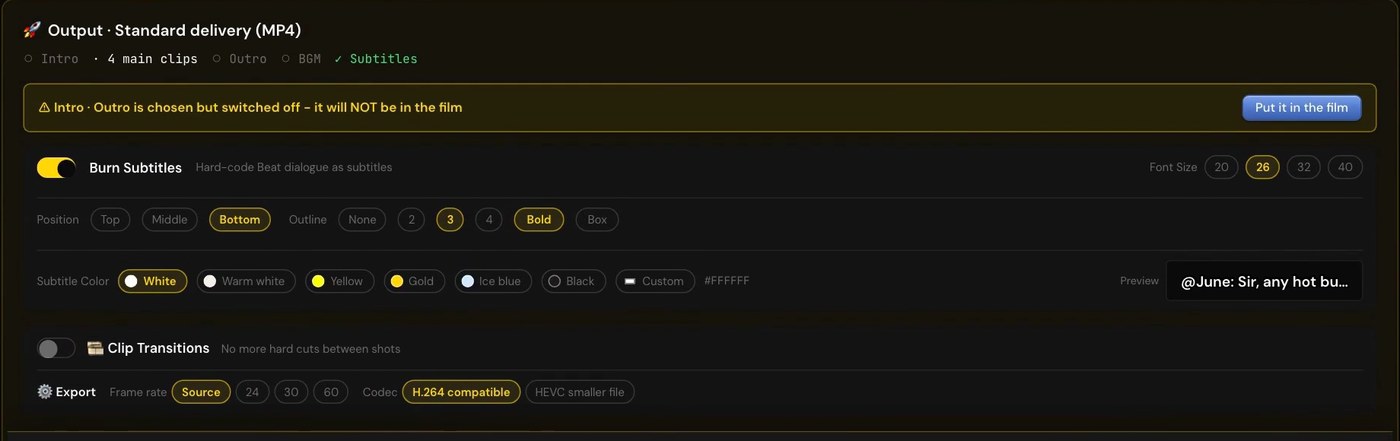
The export panel has a "Burn Subtitles" switch, on by default. Export with it on and the subtitles are burned into the picture: one MP4, the version you post.
While it's on, you can set font size, position (top, middle, bottom), outline, bold, a background box and the subtitle color, with a preview on the right.
3. Burn-in off: a clean master plus an SRT
Turn "Burn Subtitles" off and export again, and you get two files: a clean master MP4 with no text in the picture, and an .srt subtitle file. As the lesson puts it, this is the clean master: when a client localizes the film or swaps the voiceover, this is the one they use.
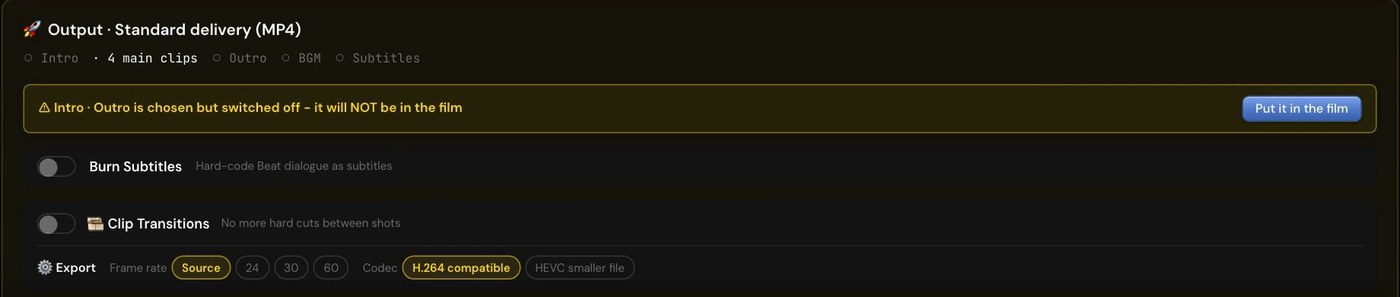
So the platform version and the clean master are two exports: once with the switch on, once with it off. The "Subtitles SRT" row in the production room can also download the SRT on its own.
→ Lesson 05-03 "Voiceovers, subtitles, merge: two versions means two exports". You finish with three files: a clean master MP4, a burned-in version for platforms, and a separate SRT.
4. Do subtitles cost credits?
- Subtitles are free. The merge (joining the shots, burning subtitles, mixing the audio tracks) is 0 credits, and exporting twice is still 0.
- Voiceovers are separate: having the characters speak their lines costs 3 credits × the number of lines, and it's off by default. Previewing a single line is free. "Regenerate all voiceovers" charges the whole episode again.
5. The ad line works the same way
On the ad line, the delivery page's post settings have "Burn subtitles (VO / dialogue)", with font size and color. The text is the same copy as the voiceover and dialogue. If the ad already has text drawn into the picture, this switch starts off so you don't get two layers of text.
When the film has dialogue or a voiceover, a "Subtitles .srt" button appears next to Download.
→ Lessons 01-05 "Combine it — and work out what it cost you" and 01-T4 "The delivery page: post settings, the ending, combine, and what appears after"
Subtitles in another language
The delivery page can switch languages: the first time you translate into a language it's 55 credits, and only the subtitles change, not the picture. See AI video translation.
FAQ
Can I upload another video and have Nova caption it? No. Nova isn't a standalone subtitle tool. Subtitles come from the dialogue in the script you wrote in Nova.
Do I have to type the subtitles? No. They come from your script's dialogue, and you can fix the text in the production room or the fine-cut editor.
How do I get both a burned-in version and a clean one? Export twice: once with Burn Subtitles on, once with it off. The second export also gives you an .srt.
Do subtitles cost credits? Subtitles and the merge are 0 credits. Voiceovers are separate, at 3 credits a line.
Where to start
- Just looking: sign up free, no card needed, and watch the free lessons.
- Ad-line subtitles are in Starter; the film line's production room and fine-cut editor are in Creator and Studio. Compare courses
- Walking through a whole short film from script to final cut: AI short film.