AI voice over: give the characters in your film a voice
To be clear up front: this page is about giving the characters in your own Nova film a voice. Nova isn't a standalone voice-over tool, so you can't drop in text or a video from somewhere else and have it voiced.
In Nova, a character's voice comes from two different places:
- A. The character speaks as the shot renders: on a video model that generates sound (Seedance, for example), when someone says a line in a shot, the model generates the voice along with the picture. You can give the character a voice first, used as a voice reference at render time.
- B. A separate voice track after rendering: in the production room, a voice track is generated from the dialogue and charged per line.
Here's each one, following the Nova Academy lessons.
A. The character speaks as the shot renders
### Give the character a voice on the Characters page Each character on the Characters page has a Voice panel with four ways in: "📚 Voice Library", "📤 Record/Upload It Myself", "🎬 Extract from Video" and "🔗 Invite Them to Record".
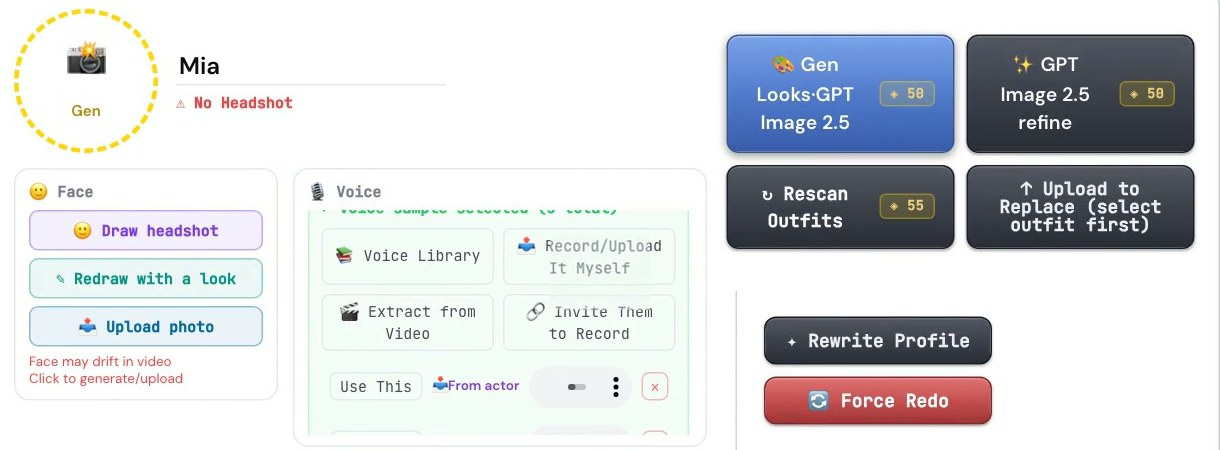
Once a character has a voice sample, Nova passes it to the model at render time as that character's voice reference, on models that take a voice reference, such as Seedance. If you use someone else's voice, get their consent first.
### Have the actor record it themselves To have a character speak in a real person's voice, ask that person to record it:
1. Characters page → the character's Voice panel → "🔗 Invite Them to Record". 2. Pick the "Actor's language", then send the actor the QR code image or the link. 3. The actor doesn't need an account. They open the link, read a short standard passage (15 seconds or less), listen back, and submit.
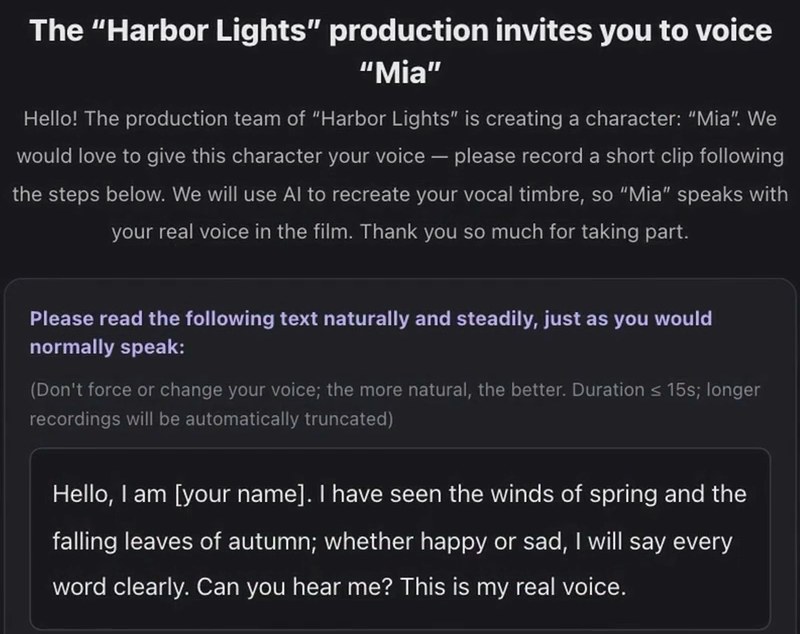
Once it's in, the character shows the voice sample as selected, marked "From actor". The latest submission is selected by default, and you can switch to another one. You can send the link to several people to audition, and every submission becomes a candidate. The link lasts 30 days, so don't post it publicly. If it gets out, use "Regenerate link (old link stops working)".
Voice collection costs 0 credits. Shots you already rendered keep the old voice, though. To use the new one, re-render those shots at the normal render price.
To check whose voice a shot will use before you render, each shot card in the storyboard has "Voice check (whose real voice this shot will use)". It only shows you, without generating anything or charging credits.
→ Lessons 04-T3 "Voice collection: have the actor record the character's voice" and 09-T4 "Storyboard · the shot card: which buttons are free, which render, which cost extra"
B. A separate voice track after rendering
Each episode's production room has a "🎤 Character TTS" row that generates a separate voice track from the dialogue.
- It's off by default. Turn it on and "Generate voiceovers for this episode" appears.
- 3 credits × the number of lines. Previewing a single line is free.
- "Regenerate all voiceovers" charges the whole episode again.
- Expand it to pick from a few preset voices and adjust volume and speed.
→ Lessons 05-03 "Voiceovers, subtitles, merge: two versions means two exports" and 05-T2 "The production room: clips, seven material rows, the final merge"
FAQ
Can I paste in text and have Nova turn it into speech? No. Nova isn't a standalone voice-over tool. It voices the dialogue of the characters in a film you make in Nova.
Can a character speak in a real person's voice? You can ask that person to record a short clip, used as the character's voice reference, so the character speaks in that voice when the shot renders. Get the person's consent to use their voice.
How many credits does voicing cost? Having an actor record a voice is 0 credits; shots you already rendered need a re-render at the render price to pick up the new voice. The production room voice track is 3 credits per line of dialogue.
Where to start
- Just looking: sign up free, no card needed, and watch the free lessons.
- Voice collection and the production room voice track are in Creator and Studio. Compare courses
- For subtitles, see AI subtitles. For language versions of a finished film, see AI video translation.