Watermark a video preview for your client, deliver the master once they pay
When you make videos for clients, you'll hear this one a lot: "I want to see it before I pay." The Nova Academy lesson's answer:
> Fair ask. But send the clean file and you've basically handed them the ad for free.
This page covers how it works on Nova's ad delivery page: send the client a watermarked sample first, then hand over the clean master once the final payment comes in.
1. Combine the final cut first
The sample is stamped onto a finished cut, so first click "Combine it" on the delivery page to make one. That step costs 0 credits.
→ Lessons 01-05 "Combine it — and work out what it cost you" and 01-T4 "The delivery page: post settings, the ending, combine, and what appears after"
2. Stamp a watermarked sample
The delivery page's download area has a "🔒 Watermarked sample (side copy — the clean master stays untouched)" panel:
1. Type the watermark text, for example the client's business name plus "review copy". If it ever gets passed around, you can tell at a glance where it came from. 2. Click "Stamp a sample (free)".
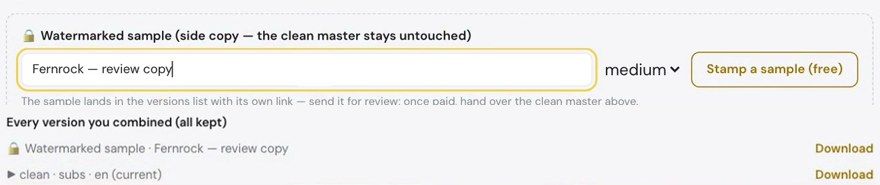
- 0 credits. Nothing is re-rendered, so it's much quicker than a render.
- The sample goes into "Every version you combined (all kept)" as a new version named "Watermarked sample · your text", next to the clean master. The master isn't touched, and you can download it any time.
- The sample is the same quality as the main cut. You can also adjust how dense the watermark is.
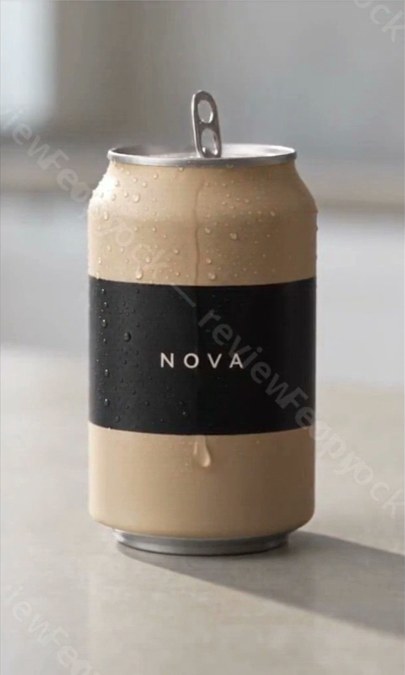
The sample is an ordinary MP4. It gets its own link in the versions list, and the page says so: "The sample lands in the versions list with its own link — send it for review; once paid, hand over the clean master above." Send the client that link, or download the file and send it however you usually reach them. They can see the content clearly, but your text runs across the whole frame, so it isn't ready to use as is.
→ Lesson 02-01 "A watermarked sample: the client can see it, not keep it"
3. Payment's in: deliver the master
- Click "Download" next to the clean cut, or download the clean version from "Every version you combined", to get the MP4.
- If the video has dialogue or voiceover, there's also a "Subtitles .srt" button for a separate subtitle file. That's useful if the client posts on other platforms or re-edits it.
- Post settings such as a corner logo, burned-in subtitles, music and transitions don't cost anything. For other language versions, see AI video translation.
The final delivery is the clean master (and the subtitle file), sent as a download link or as files.
→ Lessons 01-05 and 01-T4
4. Sending a link? Open it yourself first
Whatever link you send a client, whether it's the sample or master download link or something public on the ad site, open it yourself first. Links to public content on the ad site should start with ads.mynova.ai. "My ads" and pages inside a project need a login, so don't send those. Before you send a link, send it to yourself and open it once in a private window on your phone. Only send it if you can see the content.
The showcase is off by default, and the case page isn't how you share a sample. Use each version's own download link in the versions list.
→ Lesson 02-02 "Send the right link — don't land them on a login page"
For film projects, the output settings in the production room also have a watermark option, applied to the exported cut.
FAQ
Does a watermarked sample cost credits? No. Stamping a sample is 0 credits, re-renders nothing, and leaves the master untouched.
Is the clean master still there after I stamp a sample? Yes. The sample is a separate version in "Every version you combined", next to the master, which you can download any time.
What does the client get? An ordinary MP4 with your watermark text across the picture. They can see the content; once they pay, you send the clean master and the subtitle file.
Where to start
- Just looking: sign up free, no card needed, and watch the free lessons.
- The watermarked sample and delivery lessons are in Starter and up. Compare courses
- For subtitle files, see AI subtitles.